 Gobo Designer
7-day free trial
Your measurements, not the manufacturer's guess
Send any gobo supplier a file that's already right. Gobo Designer gives you 1:1, already-keystoned artwork with every size on its title block, so you can say "make this" and check their proof against your own numbers before anything is cut.
£9 a month or £79 a year
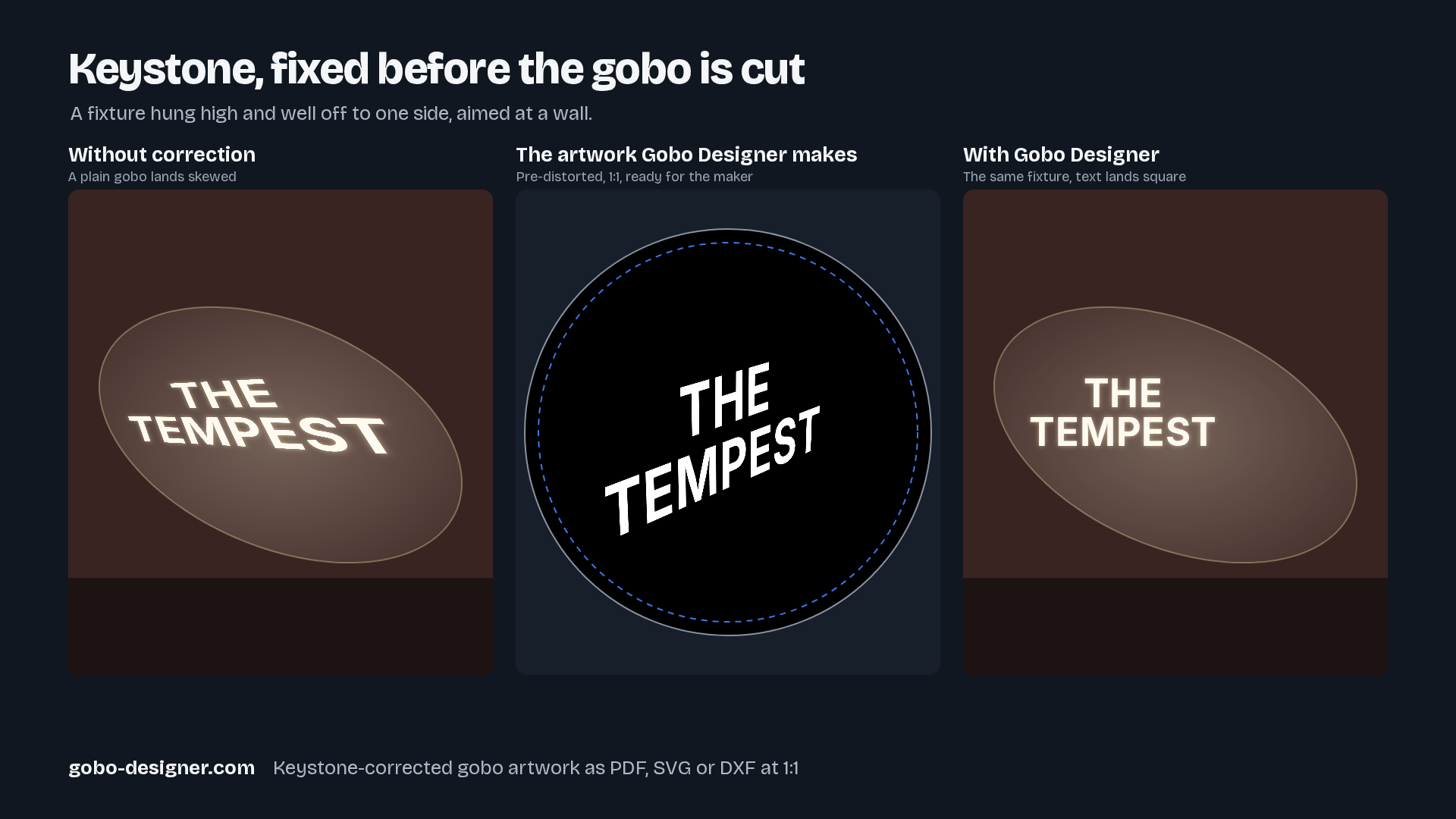
You own the measurements
Take it to any supplier
Export SVG, PDF or DXF at 1:1, already corrected for the angle. Send any supplier a file that's already right, instead of relying on a correction done out of your sight.
Check the proof yourself
The title block carries the throw, offsets and projected size. Catch a wrong proof before it's cut, not at the focus session.
Cheaper than a remake
One remade gobo costs more than months of Gobo Designer, and the lettering is the part that goes wrong when the numbers aren't yours.

Three steps from rig to gobo
1. Rig the fixture
Pick a fixture from the library of 84, or open an MVR scene from Vectorworks, grandMA or Capture and bring in the fixtures, focus points and surfaces from your plot. Or place it by hand and aim it at the wall, floor or set piece.
2. Type it, or drop in a logo
Set the text in a bundled font or your own, or load an SVG logo. Fit it to the image circle, then bend it, correct it for a seat, or corner-pin it.
3. Export for your supplier
PDF, SVG or DXF at 1:1, plus a Gobo PNG for your visualiser and a Wall PNG for the paperwork. Print a focus card for each fixture, or share the project as a link.
See it land before you order it
Logos, not just letters
Drop in a vector logo and it is corrected the same way as text. Gobo Designer reads the filled shapes, tells you how many pieces of light they make, and flags strokes or slivers that a supplier could not cut.

The rig in 3D
Orbit around the rig to check it from any side, with a compass that always shows which way is stage left, upstage and up. The 3D view shows the lit image where it lands, with its dimensions, and can paint a brightness map or a focus map showing where the gobo will be sharp.

Several fixtures, one image
Stack beams from up to four positions on the same words. Each fixture gets its own gobo, worked out so the images land on top of each other, each with its own numbers for the supplier. Re-aim one fixture and the others follow.

Checks before you spend money
Each warning is in plain English, with the fix next to it: focus spread across a raked throw, the thinnest stroke, letters whose middles fall out on steel, text that leaves the beam, and how dim the far end gets.

Start from your plot
Open an MVR file from Vectorworks, grandMA or Capture. It is read in your browser, and you pick up to four fixtures. Gobo Designer takes their positions, focus points, rigging position names and fixture types, with surfaces taken from the 3D set.
Curves, corners and steps
Put the image on a concave cyc, round a column, across an inside or outside corner, or down a wall onto the floor in front of it. The image is laid out on the surface itself, so a tape laid along the set measures true, or made to read flat from one seat.
Moving lights, pan and tilt
For any mounting you get the pan and tilt DMX values, as 16-bit coarse and fine and as a percentage, and it tells you when a target is out of reach. Direction is not standardised, so check at 50% pan and 50% tilt on the fixture.
A focus card for the rig
Print one A4 or Letter page per fixture: how the gobo goes in, where to aim, the beam size to zoom to, tape-measure positions for the image's corners and centre, and a focus checklist.
What your supplier gets
- PDF, SVG or DXF (R12) at 1:1, ready to send as it is.
- Gobo sizes A, B, E and M, set by the fixture you pick, from 84 fixtures including 52 moving lights with custom-gobo slots.
- Checks for lines, bridges and detail against cautious defaults (0.5 mm on steel, 0.2 mm on glass). Enter your supplier's own figure in the Finest line override.
- Keystone figures: perpendicular throw, X and Y offset and projected size.
- Runs in your browser. Your artwork is not uploaded.
Guides
Questions
What is keystone distortion on a gobo?
When a profile fixture hits a surface at an angle, the far side of the beam spreads wider than the near side, so straight text fans out into a trapezoid. Gobo Designer works out that distortion from where the fixture hangs and where it points, and pre-distorts the artwork the opposite way so it lands square. The keystone correction guide explains it in more detail.
Which fixtures and gobo sizes does it know?
It ships with 84 fixtures. 32 are conventional profiles, including the ETC Source Four family and ColorSource Spot, Robert Juliat, Selecon SPX and Pacific, Strand SL, Chauvet Ovation, Martin ELP, Prolights and Arri Orbiter projection optics, covering A, B, E and M size gobos. The other 52 are moving lights with custom-gobo slots, from Robe, Martin, Vari-Lite, ETC and High End, Ayrton, Chauvet, Elation and Clay Paky. You can also import your own fixture data, or take a fixture from an MVR file. Check the holder and lens against your rig before you order. The gobo sizes guide lists the sizes and image areas.
Can it project onto a curved cyc or round a corner?
Yes. As well as walls, floors and any flat plane, a surface can be curved (a concave cyc or curved flat, or a convex column) or folded (an inside or outside corner, a wall with the floor in front, steps). It warns when part of the image falls on a face turned away from the fixture or in the shadow of a corner. One image covers one surface, curved or folded, at a time.
How do I know if the whole image will be in focus?
A lens is sharp at one depth along its beam, so on a raked throw, a curve or a fold some of the image sits nearer or farther than the rest. Gobo Designer warns when that spread is too wide, and the Focus overlay shades the beam green where the gobo will be sharp, amber where it softens and red where it blurs. Depth of field (lens aperture, iris) is not modelled, so treat it as a guide.
What do I send to the gobo maker?
Export the artwork at 1:1 as PDF, SVG or DXF. The app also shows the keystone numbers that makers such as Rosco ask for: perpendicular throw, X and Y offset, and projected size. No maker publishes minimum line sizes, so the presets use the same cautious defaults; if your maker gives you a figure, put it in the Finest line override. See preparing artwork for a custom gobo.
Can I open my Vectorworks plot?
Yes, through an MVR file. Export an MVR from Vectorworks, grandMA or Capture and open it in Gobo Designer. It is read in your browser, and you pick up to four fixtures. It brings in their positions, focus points, rigging position names and fixture types, plus pan and tilt travel for moving lights. The MVR and moving lights guide walks through it.
Is my artwork uploaded anywhere?
No. The text, positions, fonts, logos and MVR files you open are worked out on your own device. Your current project is kept in this browser only, and Save downloads a project file you keep. The privacy notice sets out what does reach us when you subscribe and sign in.
Does it work on a phone or tablet?
Yes, the layout adapts to small screens, but a laptop or desktop with a mouse is easier for detailed work. Exports are file downloads, so use a desktop browser or Safari rather than an app's built-in browser.
Put your words on the wall
Try it for 7 days. Your measurements, your file, your call. See pricing.